
When you train an employee with compliance training or soft skills, it fails most of the time because the learner isn’t mentally present in the room or situation for which you are training them. In a normal online course, learners click next without thinking about consequences. They don’t have the pressure of compliance to decide between “quietly take care of the issue” or “Report Immediately”. Storytelling fixes that; it puts the pressure back on the course. It creates a realistic situation similar to the learner’s job, a choice that can go either way, and the consequence the learner has to sit with.
Storytelling in eLearning
Storytelling in eLearning is the process of presenting information and ideas using a story with the help of characters, conflicts, and resolutions. eLearning content with storytelling increases learner engagement, resonates with them, and improves knowledge retention.
What is Interactive Storytelling?
Interactive storytelling is a combination of storytelling with interactivity, and learners’ interactivity decides how the story goes. You can create eLearning content for interactive storytelling with the help of authoring tools.
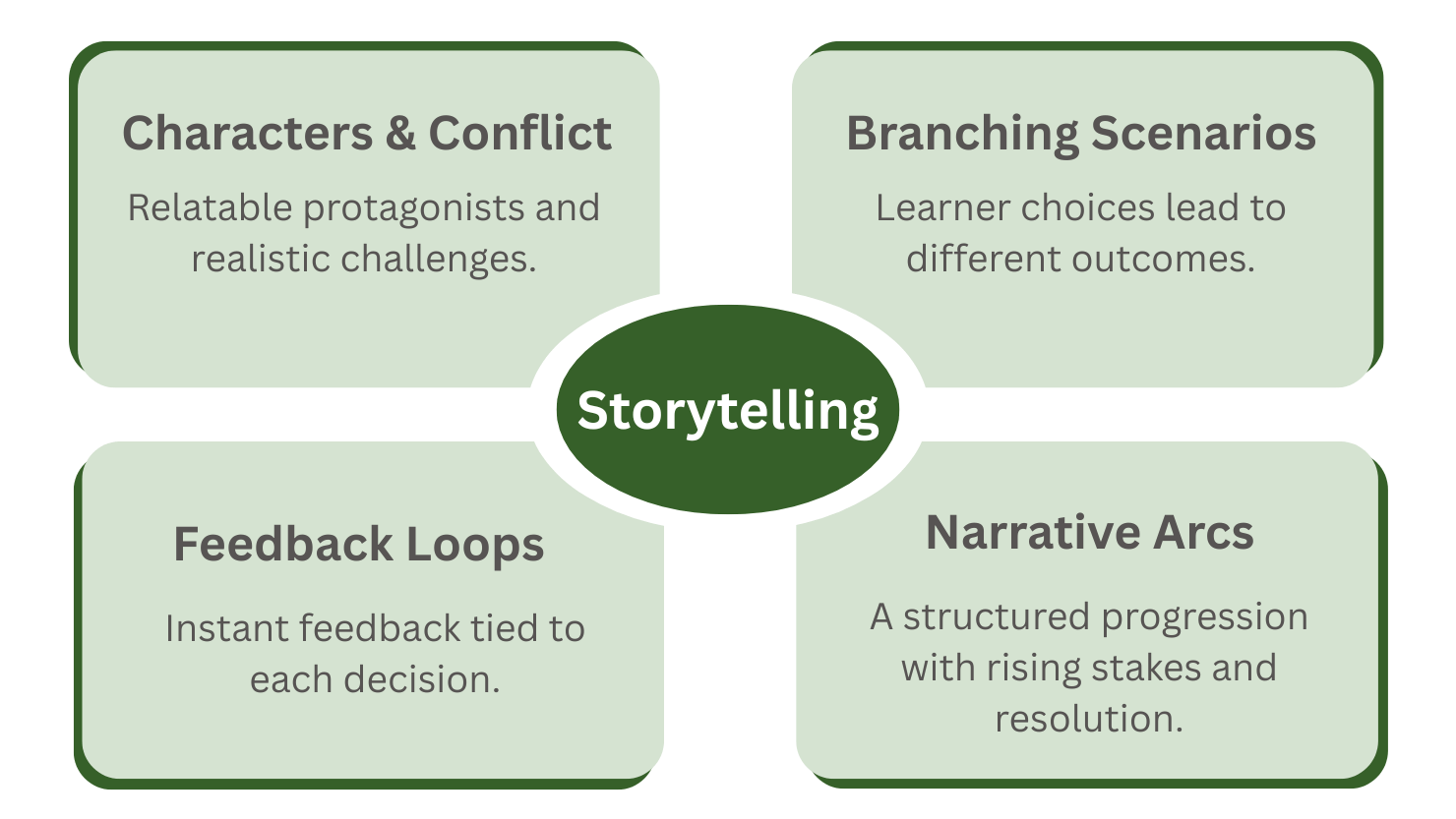
Key components of storytelling
- Characters & Conflict: Relatable protagonists facing realistic challenges, not cartoon villains.
- Branching Scenarios: Learner choices change what happens next, not just the score.
- Feedback Loops: Instant, contextual feedback that shows why a choice worked or failed.
- Narrative structure: A clear arc (setup > rising decisions > resolution). Three simple models work well:
- Three-act structure: Act 1 sets the scene and the problem, Act 2 presents 2–4 rising decisions with increasing stakes, Act 3 shows the outcome and a short debrief. Ideal for 10–15 minute modules.
- CCAF (Context > Challenge > Activity > Feedback): Put the learner in a realistic context, present a meaningful challenge, let them take an action that mirrors the job, then show the consequence plus teaching feedback. Every interactive screen should pass this test.
- 3 Cs (Challenge > Choices > Consequences): One clear challenge, 2–3 plausible choices a real person might make, and a visible consequence for each (including the “okay but costly” middle option). Re-merge paths later so the tree stays manageable.
Why does Interactive storytelling work?
Stories bring emotions such as joy, frustration, empathy, and pride. These emotional anchors the learning experience when you use storytelling in eLearning. Stories include components like characters and scenarios. When learners connect with these elements, they are more attentive, motivated, and remember the information they see.
You can simulate real-life situations in storytelling to teach learners the practical use of the lesson they are learning. Practically applied information is more likely to be retained than theoretical lessons.
Example: For cybersecurity training, while experiencing story-based learning content, if the learner decides to open a suspicious email and, as a result, they face consequences, the learner is more likely to remember this experience than just reading about the phishing risks through a PDF.
In 2011, Traci Sitzmann, a respected training researcher at the University of Colorado Denver, ran an experiment (source). She collected 65 studies that tried to compare computer-based simulation games against other training methods. Those studies covered a total of 6476 trainees. She averaged the results statistically so that one clear picture emerges.
She found improvement across different outcomes, as shown in the table:
| OutCome | Average Improvement |
|---|---|
| Factual knowledge (declarative) | +11% |
| How-to / procedural knowledge | +14% |
| Ability to remember it later (retention) | +9% |
| Confidence they can do the job (self-efficacy) | +20% |
The benefits were strongest when the experience was active (not just watching), could be replayed, and was used alongside other training methods rather than as a standalone course.
Real-world use cases of interactive storytelling
Storytelling works across many roles. Here are three common places it delivers clear value.
1. Corporate Compliance Training
Compliance training is often considered dry and boring. The traditional method of compliance training does not engage employees and sometimes fails to show the real-world results. On the other hand, story-based compliance training places learners into a moral or legal dilemma within a realistic story, and the learner’s focus shifts from memorizing the rules to understanding the impact.
Example: In a data safety training, a learner is put into a situation where he is a team leader and one of the junior developers mistakenly pushes sensitive data to the public. The learner, as team leader, has choices such as reporting immediately, first talking to the developer, or fixing it quietly. Each choice will lead to different consequences. Learners will be more likely to remember this experience than reading a bunch of compliance rules from a PDF.
2. Healthcare Training
Healthcare is a field where workers have to make critical decisions under pressure, and mistakes can have life-or-death consequences. Training a new worker in a real-life situation can be costly and risky. This is where story-based training simulation helps. Simulation allows for no risk, but real-life situations with emotions like stress, urgency, and moral tension, whereas storytelling helps learners to remember everything.
Example storyline for learner: The learner is placed into a situation of a nurse handling four patients during the emergency room night shift. A new patient comes in with chest pain, and the communication device buzzes with an alert from another ward. This is where the learner will have to prioritize the decisions, such as attending to the new patient, delegating to a less experienced nurse, or calling the attending physician. Each choice has different consequences.
3. Sales and Customer Conversations
You just read how stortelling put learner into situations of high stakes with their impact in Compliance Training and Healthcare Training. Learners take things seriously and learn how to operate in those fields, but Sales is quite a different domain. If something goes wrong while handling a customer, you lose the sale; it doesn’t have as severe an impact as the previous two in a sudden moment, but it affects the ROI. Interactive storytelling can be used to put sales trainees into the situation of an active customer conversation with branching scenarios of decisions and outcomes.
Example: The learner is a sales representative on a discovery call. The potential customer says, “We’re already working with another vendor, and the contract still has eight months left.” The learner must choose: push a discount, dig into what is actually missing, or talk past the objection and continue the pitch. Each path produces a different buyer reaction and a different next step, giving the learner practice in reading the room rather than just following a script.
Linear story, mini-scenario, or full branching?
Branching scenarios are actively used in storytelling to provide learners with decision-and-outcome experiences to improve decision-making, judgement, etc. But sometimes it is overused. You don’t need branching scenarios in everything; you can follow these basic rules to decide how you would present your story.
- Linear Story: If you are training a learner in a flow of process. such as “how to submit a safety incident.”
- Mini Scenario: If learners are to be trained about one important decision, here only one path is correct. Such as “If a customer is shouting, what do you say first?”
- Full Branching: It’s good for training judgement, trade-offs, and time pressure; it is generally complex, where one bad decision can put the learner in a bad scenario, but there are more decisions to make to recover the situation.
If the problem is that people don’t know the steps, keep it linear; or if people know the steps and still freeze or take the easy way out, build interaction branches.
Designing tips for effective interactive stories in eLearning
If you want to incorporate storytelling and make impactful interactive content, you can follow these design tips.
Start with an end goal
Defining the learning objective should be the number one priority before you write a story. Your narrative and the choices learners make in your interactive story should align with the objective.
Use the backward design technique: write the goal and outcome you want from the story, and determine assessment (and decision-based assessment) based on the goal. Create a story that has these decisions mapped, along with an assessment.
Keep it relatable and real
The story should be relatable, as relatability in a story builds an emotional connection between the learner and the content. Scenarios in the story should reflect actual challenges learners may face while practicing the thing they are learning.
Find the real pain points in the learning content with the help of a subject matter expert and the learner’s feedback. Avoid over-the-top plots or idealized characters.
Limit Complexity
Keep it simple; don’t add too many decisions and branches. Complexity not only adds development time but also confuses learners. Use 2-3 meaningful choices per scenario; limit the branches to 2-4 outcomes.
Use multimedia thoughtfully
Visuals, narration, music, and animations make the story more immersive. But include them only if they add to the learning and do not work as a distracting element. Adding multimedia creates multisensory learning, which improves knowledge retention.
Include Meaningful Feedback
Feedback helps learners understand why a choice was right or wrong; it closes the learning loop. Every decision in an interactive story should be followed by immediate and contextual feedback.
Example: in a story for training medical workers. If a learner chooses to ignore the patient’s complaint, a feedback screen could explain why that erodes trust and show an alternative approach.
Designing tips summary table:
| Tip | Why It Matters | Practical Action |
| Start with the End | Aligns story with goals | Write learning outcomes first |
| Keep It Real | Boosts connection and engagement | Use authentic challenges |
| Limit Complexity | Avoids overload | Use shallow branching |
| Use Multimedia Thoughtfully | Enhances immersion | Use only media that adds clarity |
| Include Meaningful Feedback | Reinforces learning | Explain why a choice was right/wrong |
Common mistakes that make interactive stories feel fake
Let’s look at all the mistakes instructional designers generally make, and what you should do instead.
Use of Wrong choices.
Example: Delete all the evidence and lie to the manager. Such a choice doesn’t help people learn anything. Learners can easily reason it’s the wrong choice and click on the correct one. Instead of “Wrong”, choices should be poor, it sholud look reasonably correct. Such as in a fire scenario: “Open the window to let the smoke out and get fresh air” sounds logical, but it will feed oxygen to the fire, spread poisonous gas, and it can create a backdraft risk.
Explaining the entire policy first
In your interactive story, put the learner straight into a messy situation with no rule explanation; they make a decision based on their current judgment, they will see the outcome, and they will learn. Explaining the entire policy creates cognitive overload.
Not connecting branched paths later
This is one of the big common mistakes. If you are splitting the story path at each point where the learner has to make a decision. And if you have a chain of such decisions, each path will grow exponentially into a massive branch of outcomes. Limit the number of outcomes and join paths that lead to similar outcomes.
Feedback arrives before the consequences.
If the learner chooses poor choice, don’t show the feedback right away; first show the consequences of the choice, then explain in the feedback how the selected choice led to this outcome.
The story and choices aren’t reviewed by a real employee
An instructional designer is not an employee who does the job for which training content is being created. Your invented situation may be unrealistic to the real employees. Show the Draft story to a few real employees and ask them if the situation feels real, whether someone actually chose the poor options, and if there is any choice missinng which people may take.
And one of the biggest mistakes is that after launch, you only see pass/fail, not the paths people actually took. Use eLearning standards like xAPI and analyze learner behavior and choices with the help of an LRS.
Tools for interactive storytelling
Authoring Tools:
Authoring tools such as Articulate Storyline, Rise, Adobe Captivate, etc, allow you to create a slide-based interface where you can create story branches, paths, scenarios, and assessments. You can support your story with characters, voiceovers, and other media.
Twine:
It is a free and open-source text-based and choice-driven story creator. It allows you to build hyperlinked stories with multiple paths, conditions, and variables. It exports HTML files.
GrassBlade xAPI Companion:
When you build story-based content, you need more than a completion certificate. You need to see which path each learner took, which choices were popular, where people hesitated, and whether they recovered after a poor decision. GrassBlade xAPI Companion can send those detailed xAPI statements (choice made, path taken, time spent on a decision, outcome) to a Learning Record Store. From the LRS, you can answer questions such as “Where do team leads freeze?” or “Do people who pick the quiet fix still pass the final check?” That data is what lets you rewrite the weak scene instead of guessing.
Conclusion
Interactive storytelling turns passive learning into immersive journeys. Learners don’t just absorb content; they become part of it. Realistic scenarios prepare learners for real-world decisions. Learners live the situation with emotions such as stress, urgency, and maybe moral tension, and this prepares them for real-life situations.
Interactive storytelling is practice for hard calls while the stakes are still fake. Keep the tree small, write choices a tired, competent person might actually make, show what happened, and look at the paths in your LRS so you can fix the scene everyone fails.
FAQs
Storytelling in eLearning is the use of narrative elements like characters, conflict, and resolution to present content. It helps learners emotionally connect with the material, leading to better engagement and retention.
Interactive storytelling allows learners to make decisions that shape the direction and outcome of the story. It combines narrative techniques with interactivity to create personalized, engaging learning experiences.
Yes, especially in compliance training and soft skills development. Interactive stories put employees in real-world scenarios, helping them understand the impact of their choices beyond just memorizing rules.
Use tools like GrassBlade xAPI Companion to track detailed user actions—such as choices made, paths taken, and responses to feedback- by sending xAPI statements to a Learning Record Store (LRS).
When there is one correct sequence and the skill is following steps, not judgment. Interactive is better when the job involves trade-offs, pressure, or ethics.
Usually 2-4 decision points. A single high-quality mini-scenario often beats a half-finished deep tree.
Yes, if you train the moment people break the rule (pressure, loyalty, speed) rather than only the text of the rule.