
In online courses, one of the common failure patterns appears to be that when a learner takes an in-depth course, logs in for day one, and looks at the massive amount of modules- each containing up to 10 videos, worksheets, and projects. The learner tries to watch a few videos of the first module and realizes that it’s a mountain of content up ahead; it will take a lot of work to complete the course. The sheer amount of cognitive load makes the learner feel too lazy to return.
Research such as Massive Open Online Course Completion Rates Revisited by Katy Jordan (from the Open University, UK) provides an important insight into learner behavior across different lengths of courses. According to the research, nearly 30 percent of the learners were likely to complete a quick course, and this percentage drops gradually to zero as the course goes on for as long as 15 weeks. And most of this drop depends on the first two weeks; if learners stick with the first 2-3 weeks, they are more likely to complete the course.
This makes one thing clear: learners don’t like massive courses, and they drop off early if they find one to be lengthy. But what would you do if the course is supposed to be big? What if your course or training program is supposed to go for weeks or months?
This is where techniques like “Drip Content” become useful. Drip content fixes a course’s immediate information overload with a structured, intentional release schedule.
What is Drip Content?
Definition: Drip content is a method of delivering course content, such as lessons, quizzes, assignments, and other course materials, periodically over time or based on learners meeting specific requirements.
Instead of dumping an entire curriculum into a student’s course dashboard at once, drip-feeding schedules course content access using rules such as the number of days from the enrollment date, a fixed date, or when a learner completes a module, passes a quiz, or meets a requirement.
How this works in practice
Let’s consider that we are providing a learner with a course on Full-Stack Web Development.
Traditional model:
Under an all-at-once model, learners will log in and see 40 hours of video across front-end design, database management, and server architecture. Learners will get overwhelmed by the sheer volume of material; they may jump straight to advanced topics by skipping the basics. After getting confused, the course will be abandoned.
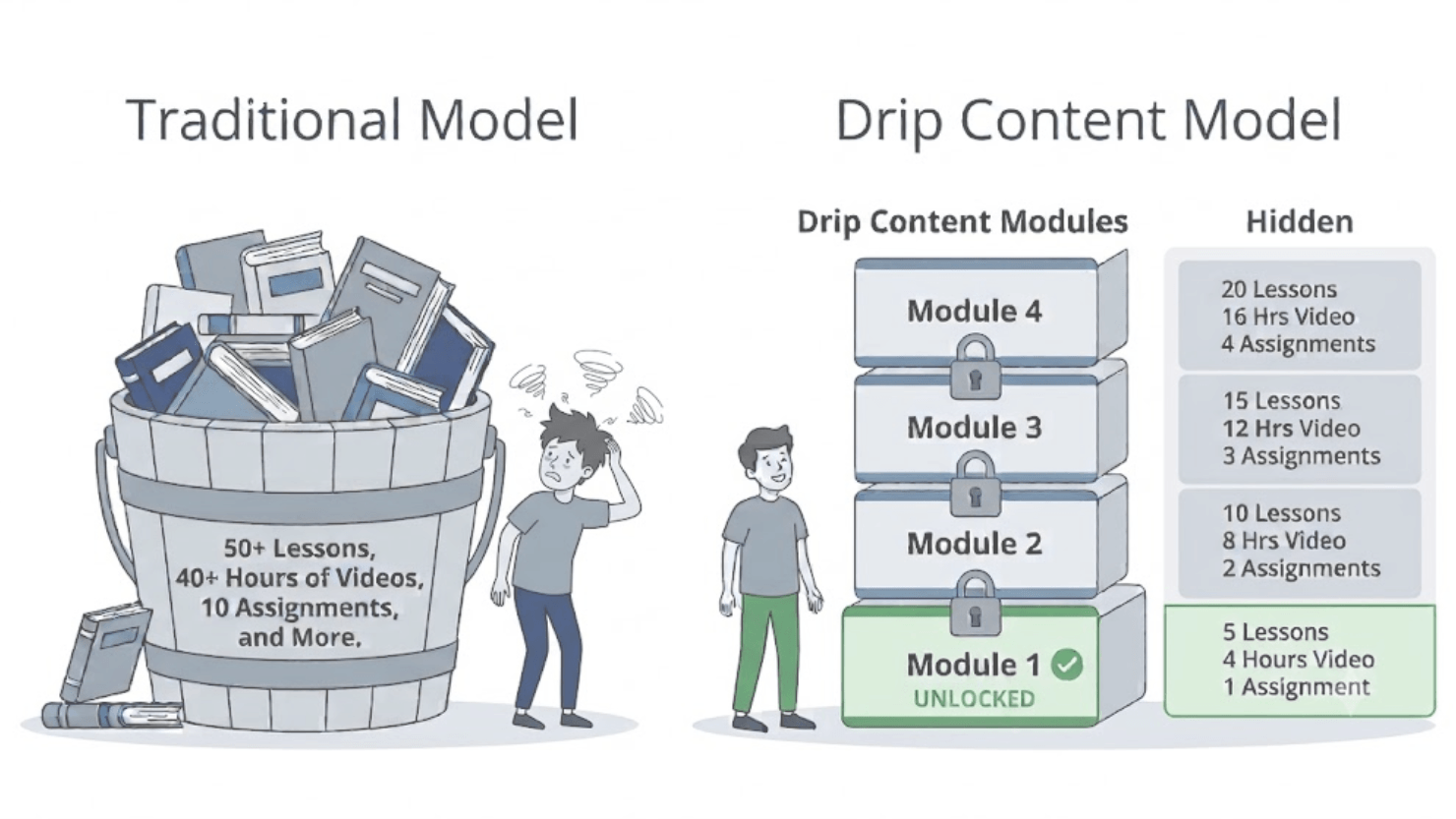
Under the drip content model:
- Day 1: The student gets access only to “Module 1: HTML & CSS Fundamentals”, along with a short project to build a single web page.
- Day 7: Once they have had time to absorb the material and submit their project, “Module 2: JavaScript Basics” automatically unlocks.
- Day 14: “Module 3: Working with APIs” unlocks, building directly on the code written in Module 2.
When to Drip Content?
Just because you know a technique doesn’t mean that you should always use it. It can backfire. If you apply release delays to the type of course that doesn’t need it. It will frustrate the learner, and if you are selling your course, there will be increased support tickets and refund requests.
Here is a quick comparison table about when to use drip feeding and when to allow full access to the course.
| Feature / Model | When to Use Drip Feeding | When Full Access Is Better |
| Primary Goal | Habit building, skill mastery, behavioral change | Rapid reference, immediate problem-solving, lookup |
| Content Structure | Linear, sequential dependencies (Lesson 2 builds on 1) | Non-linear, modular, independent topics |
| Course Types | Cohorts, bootcamps, employee onboarding, recurring memberships | Code/recipe repositories, template libraries, technical references |
| Business Model | Subscription/membership retention, reducing churn | High-ticket one-off purchases where power users expect instant access |
| Pacing Risk | Learners freeze when seeing too much at once | Learners get blocked from completing urgent workplace tasks |
Why Drip Content Works
There is science behind everything; many people use this technique by following other instructional designers or tips. What principles are working behind the scenes? Knowing them will help you understand the drip content technique and how to use it correctly.
The Spacing Effect and Cognitive Load Reduction: When learning content is distributed in small chunks over deliberate intervals, it reduces cognitive load for the learner. Learners retain higher long-term knowledge compared to massed practice or cramming. 5-15-minute lessons at regular intervals keep working memory unburdened, and this applies to larger scales as well.
Behavioral Momentum (The Zeigarnik Effect): People remember things that are incomplete over complete ones. When the upcoming module is visibly locked with some timer or requirement, it creates anticipation rather than an overwhelming backlog.
The Cadence Matrix: 3 Core Drip Frameworks
For an effective drip content system, you can incorporate one of these three distinct operational frameworks.
Evergreen Delivery (Time-Relative Cadence)
McGraw Hill created this model for industry-first course or training publishing, where “evergreen” describes a software/digital product that updates continuously.
In this drip content model, content unlocks at a set number of days from the user’s enrollment. It is best for self-paced courses and ongoing subscriptions.
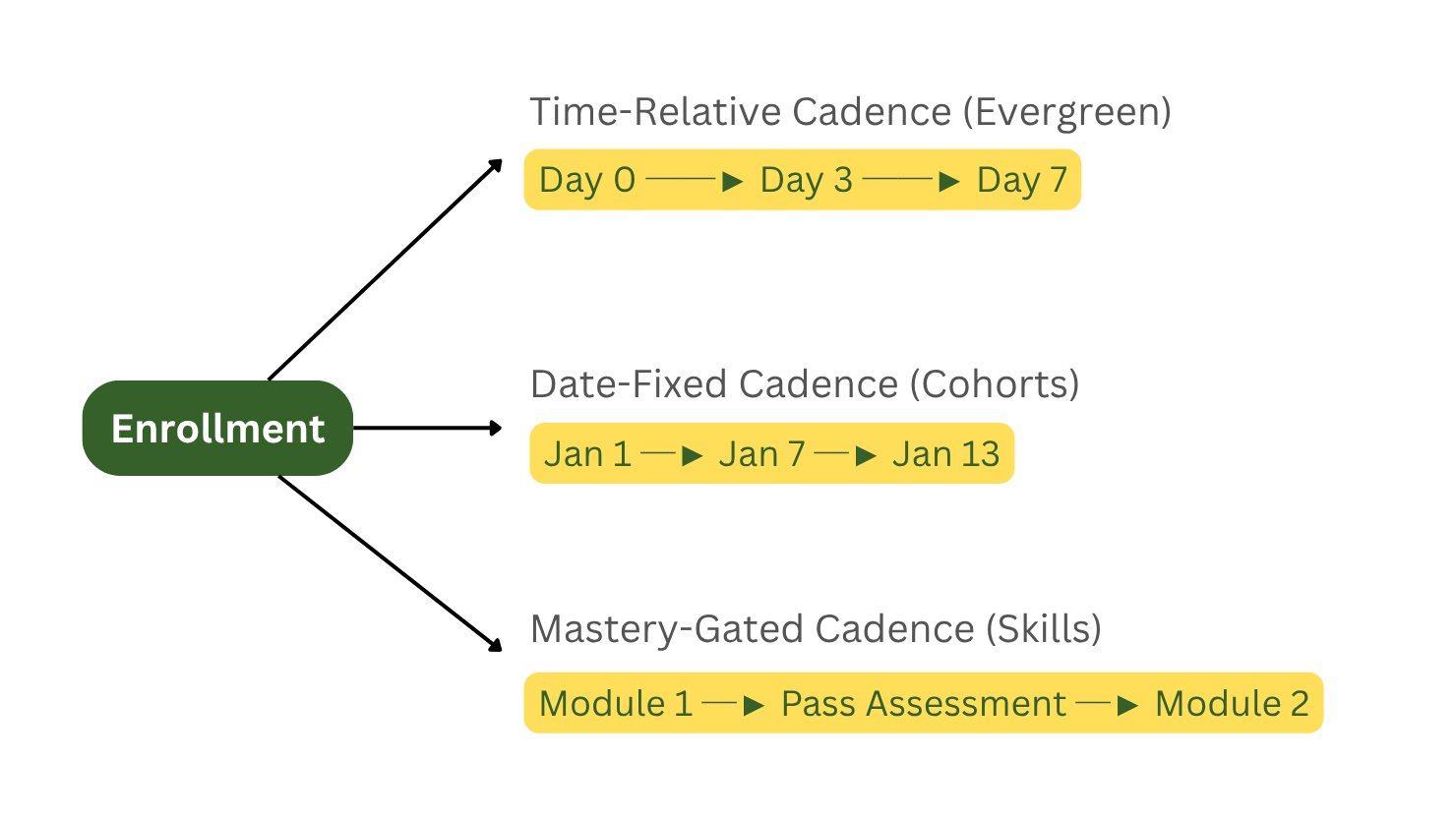
Synchronous Cohorts (Date-Fixed Cadence)
In this model, content unlocks simultaneously for all students, regardless of when each individual enrolled. It is best for live bootcamps, university semesters, and synchronized product launches.
Mastery-Gated Cadence (Behavioral/Prerequisite Triggers)
This model is requirement-based: when a learner meets the requirement, such as watching a video completely, completing a lesson, or passing a quiz or an assignment, it triggers a new module unlock. This one is designed for training such as compliance certification, technical skills, and high-accountability professional training.
Step-by-Step: Implementing an Effective Drip Strategy
A successful drip campaign execution requires structured pacing and active learner communication:
Calculate the “Consumption-to-Action” Ratio:
The first question should be: How long does it take a student to absorb the material and apply it? If a module requires 30 minutes of video and 2 hours of independent implementation, set your drip interval to 3 to 5 days, not 24 hours, to ensure that the learner properly consumes your content.
Front-Load an Early Win:
Earlier, we talked about how Katy Jordan’s research suggested that most of the drop-off was happening early, within two weeks. This is why it’s important to make sure that Module 1 delivers an immediate, tangible result within 48 hours. An early win solidifies commitment before the first release interval begins.
Configure Locked-State Visibility:
Dripping content means that we are feeding the vastness of a course or training in smaller parts periodically, but this doesn’t mean that we hide what the course is going to teach later. Keep future lessons/module visible but keep them locked, so learners can’t access all of its content to figure out how much time it will take to complete that lesson/module. If upcoming lessons aren’t shown, then the course will appear thin.
Automate Milestone Notifications:
Learners should be notified of a drip unlock; if it’s a time-relative or date-fixed unlock, the learner should be notified through email or any other messaging channel.
Add an Accelerated Track for Advanced Users:
You locked the content, but every learner is different. If you force a learner with Module 1 basics and the learner turns out to be already equipped with equivalent skills or knowledge, the learner is going to find the content boring. If they don’t feel any achievement completing a module, learners may drop off after getting bored.
To fix this, it is important to have an adaptive learning system that allows a pre-test to assess the learner’s current capability and, based on that, fast-track them to the module they are competent enough to learn.
Deep Dive: Analytics, Failure Modes, and Retention Mechanics
A miscalculated pacing of drip content can degrade a course or training performance. You just can’t expect results just by incorporating drip content scheduling alone. Analyzing some important metrics will help you make sure your drip content pacing is correct.
The 4 Warning Metrics
Module Unlock-to-Open Lag: The elapsed time between when a lesson unlocks and when the learner logs in to view it. If the average exceeds more than 5 days, your lessons are unlocking faster and causing a backlog, or it could also be that the automated notification is underperforming. It can be confirmed by comparing with previous module completion data.
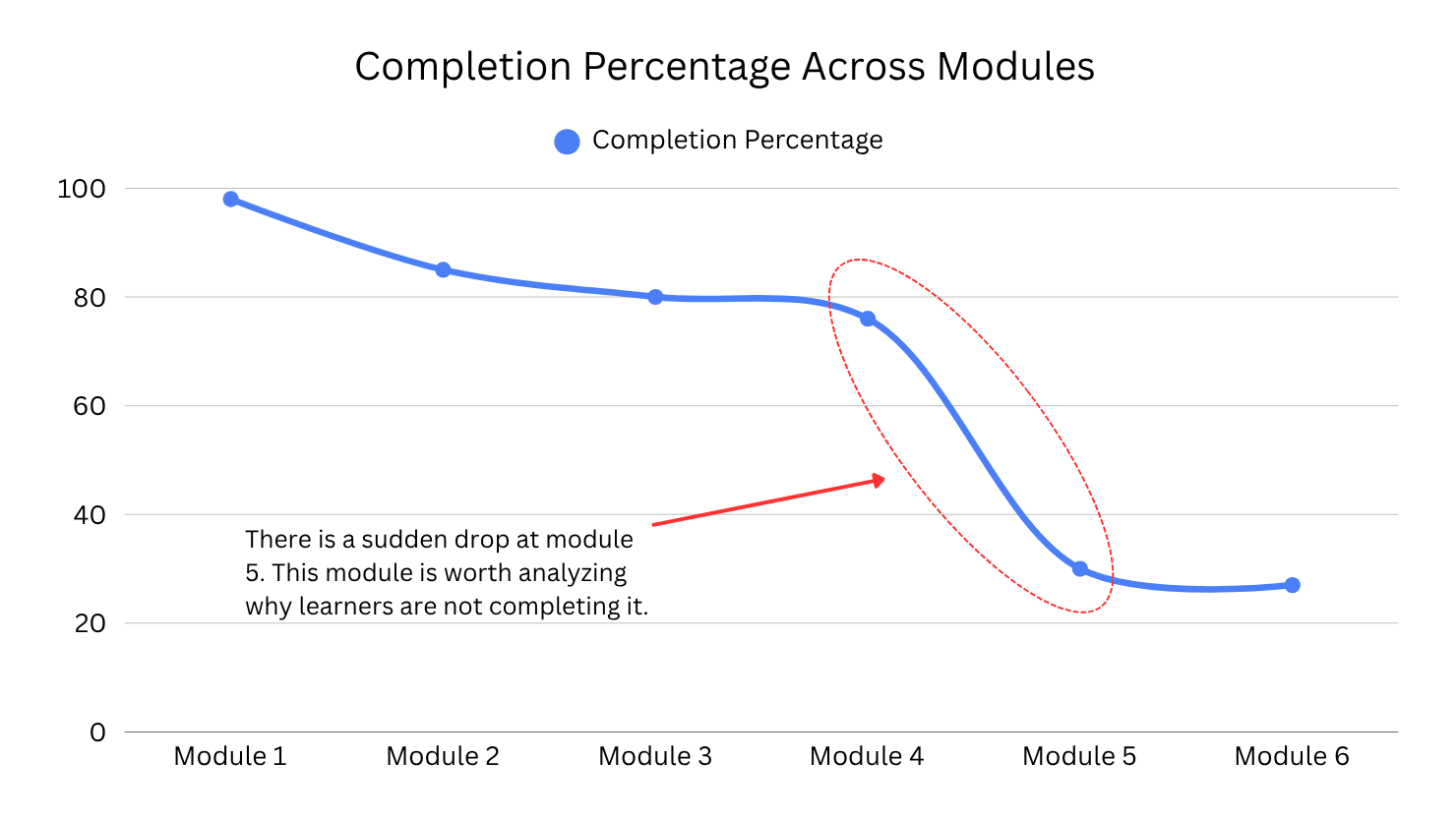
The Drop-off Cliff: Each module completion percentage needs to be tracked to make sure there isn’t any sharp drop between two modules. If there is, it’s probably excessive friction, confusing instructions, or an overly long task in the module.
Assessment Retry Ratios: If users are coming back to a previous module and retrying the content, this means that the previous content failed to teach the required concept clearly. You need to optimize the module to ensure it prepares learners for the next module.
Skip-Ahead Support Volume: An influx of tickets asking to “unlock the full course” indicates your release schedule is lagging behind user demand.
Common Pitfall and Solution
- The Vacation Lockout: A learner takes a break for maybe 10 days and then returns and finds out six modules unlocked at once; the overwhelm returns.
- Fix: Use milestone-based progression so absent learners don’t get access to the new content; they resume exactly where they left off.
- Rigid Cadence for Varied Learners: In the step-by-step implementation section, we covered how learners can vary, and they may already be skilled with the current unlocked module. Similarly, some learners may finish a module in 3 days, but you set the next module to unlock after 10 days. A week-long wait may make learners disengage out of boredom.
- Fix: If you are using a time-based cadence for drip content, add an optional assessment tool, such as a quiz, to unlock the next unit by demonstrating competence.
Native Drip Capabilities Across Popular LMS Platforms
Drip content is such an important technique of eLearning that almost all the major LMSs provide you with a tool to set it up, whether you are using a WordPress LMS or SaaS.
Let’s look at some of the WordPress LMSs and the Moodle LMS.
| LMS Platform (Availability) | Supported Drip & Access Rules | Official Setup Location |
| LearnDash (Built into Core) | • Enrollment-Based (days after registration)• Specific Date• Linear Progression / Lesson Prerequisites | Lessons > Edit > Settings tab > Lesson Access Settings |
| Tutor LMS (Requires Pro Addon) | • Specific Date• Days after enrollment• Sequential progression• Prerequisites (passing specific lessons/quizzes) | Tutor LMS Pro > Addons > Content Drip, then configure in Course Settings > Content Drip |
| LifterLMS (Built into Core) | • Days from enrollment date• Days from course start date• Specific date• Section or Lesson-level gating• Lesson prerequisites | Course Builder > Lesson/Section Settings (Gear Icon) > Drip Settings |
| LearnPress (Requires Content-Drip Add-on) | • Duration after enrollment (hours/days)• Prerequisite completion (previous lesson/quiz) | Course Settings > Content Drip |
| MasterStudy LMS (Requires Pro / Pro Plus Add-on) | • Specific calendar date• Sequential progression (locks until prior lesson/quiz is completed) | LMS Pro Addons > Drip Content, then configure inside Course Builder / Curriculum |
| WP Courseware (Built into Core) | • Interval after enrollment (hours, days, months)• Specific date• Automated unlock notification emails | Course Units > Unit Editor modal > Drip Feed Settings |
| Sensei LMS (Included in Sensei Pro) | • Specific date• Interval after course start date (days/weeks/months)• Manual instructor override per student | Course Editor (Sidebar) / Lesson Editor > Content Drip Panel |
| Moodle LMS (Built into Core) | • Date/time restrictions• Activity completion criteria• Minimum grade/score requirements• User group/cohort restrictions | Site Administration > Advanced Features > Restrict Access, then per-activity under Restrict Access |
Hosted SaaS Learning Platforms (Teachable, Thinkific, Kajabi)
If your academy runs on an all-in-one hosted SaaS platform rather than a self-hosted LMS, content dripping is built natively into their core builders (usually requiring a paid tier, such as Thinkific Basic or Teachable Basic and above).
| SaaS Platform (Availability) | Supported Drip & Access Rules | Official Setup Location |
| Thinkific (Basic plan and above) | • On enrollment date (immediate)• By specific calendar date & time• Staggered days from enrollment date• Staggered days from learner start date (first course access)• Chapter or lesson-level scheduling | Products > Courses > Edit Content > Settings > Drip Schedule |
| Teachable (Basic plan and above) | • Specific calendar date (at 0:00 UTC)• Days after student enrollment• Section-level gating only• Automated email announcements (sent 15 hours post-drip) | Courses > Curriculum > Section > Drip |
| Kajabi (Built into all plans) | • Specific calendar date (via “Schedule” status)• Days after customer access/enrollment date (1 to 731 days)• Module & submodule level gating• Automated unlock notification emails | Products > Courses > Course Outline > Module Status Dropdown > Drip / Schedule |
Recommendation: WordPress LMS offers many more features and customization; on top of that, you own your data.
Key Takeaways
Drip content is not just a feature to control access; it’s an instructional design strategy to balance cognitive pacing and student motivation. And it is not supposed to be used just because this feature is available in your LMS. To apply this strategy effectively:
- Learners have to be analyzed when they are completing a module to see if they are returning to the previous module.
- The previous module has to prepare the learner for the next one.
- Pacing shouldn’t be too fast or too slow to ensure learners who complete a module don’t have to wait much for the next one, and a new module shouldn’t be available while learners are still stuck at the current module.
- Learners have different learning paces or knowledge levels. If some learners complete a module quickly or already have knowledge equal to the module, you should provide a simple test for them to prove their competence and fast-track them to the module they need to learn.
Frequently Asked Questions (FAQ)
Yes, for long courses related to skill building, drip content is intentionally used to stop learners from binge-watching the course. Binge-watching creates an illusion of competence without practical skill retention.
In subscription memberships, unlocking content incrementally prevents learners from downloading all resources at once during the trial period and stops them from immediately cancelling.
For self-paced courses with practical assignments, 3 to 7 days is standard. For high-intensity micro-learning bootcamps, daily 5-minute modules with quick quizzes work well. Always base the schedule on the time required to complete the accompanying exercises.
Keep them visible but locked. Showing future modules with clear titles, short summaries, and unlock schedules provides a visual roadmap of what lies ahead, boosting completion drive without causing immediate overwhelm.