

Quick Answer: What is cmi5?
cmi5 is a modern eLearning specification that combines the structured course packaging and LMS launch rules of SCORM with the deep, flexible data-tracking power of xAPI (Experience API). Technically defined as an “xAPI Profile,” cmi5 tells Learning Management Systems (LMS) and digital learning content (Assignable Units) exactly how to import, launch, authenticate, and report standardized completion and pass/fail statuses to a Learning Record Store (LRS), whether the content lives inside the LMS, on an external cloud CDN, or inside a mobile app.
For over two decades, instructional designers and LMS administrators have been stuck in a frustrating tug-of-war between two standards:
- SCORM: Reliable for packaging a course and getting a simple “Completed/Passed” checkmark in an LMS, but technologically stuck in the early 2000s, reliant on browser frames, blocked by cross-domain security, and blind to rich learning analytics.
- xAPI (Tin Can): Capable of tracking virtually any learning experience across mobile apps, simulations, VR, and web pages, but lacking strict rules for how an LMS should package, launch, and interpret course completion.
Enter cmi5. Developed originally by the AICC and transitioned to the Advanced Distributed Learning (ADL) Initiative, cmi5 was built specifically to solve this divide.
In this guide, we will break down exactly what cmi5 is (and clear up a common myth about its name), explore how its architecture works under the hood, compare cmi5 vs. SCORM vs. xAPI, and show you how to deploy cmi5 content today.
Clearing Up the Name Myth: What Does “cmi5” Stand For?
If you search around the web, you will occasionally see poorly researched articles claim that cmi5 stands for “Content Management Interoperability Services” (which is actually CMIS, an unrelated document management standard). This is completely false.
Here is the real history behind the name:
- “cmi” stands for Computer Managed Instruction. It originated in the late 1980s and 1990s with the AICC (Aviation Industry Computer-Based Training Committee), which created the very first interoperability specifications for tracking digital training (and which later formed the foundation for SCORM).
- “5” is not a version number, there was never a cmi1, cmi2, cmi3, or cmi4. When the AICC committee began designing a modern successor to AICC and SCORM using the xAPI communication layer, the specification went through five major architectural redesigns before the committee settled on the final xAPI-based framework. They named it cmi5 in honor of that fifth iteration.
- Notice the lowercase spelling: per official ADL guidelines, it is always written as cmi5 (lowercase cmi, no space before the 5).
In 2014, when AICC dissolved, ownership of the cmi5 specification was formally transferred to the U.S. Department of Defense’s ADL Initiative, which released the first production version (the “Quartz” release) in June 2016 and continues to maintain it via the cmi5 Working Group and the Project CATAPULT conformance test suite.
Why Was cmi5 Created? (The Problem with “Pure” xAPI in an LMS)
When xAPI was released as the philosophical successor to SCORM, eLearning developers celebrated its freedom. With xAPI, any activity could send an Actor – Verb – Object statement to a Learning Record Store (LRS).
However, when organizations tried to use raw xAPI packages inside a traditional LMS, they hit a wall: xAPI intentionally did not define LMS launch, authentication, or completion rules.
- One authoring tool might record completion using the verb
completed, while another usedfinishedormastered. - Because xAPI had no standard package manifest for LMSs, two different LMS platforms often interpreted the exact same xAPI course differently.
- Security was tricky: how does a course safely get temporary credentials to write to the LRS without exposing API keys in the browser?
cmi5 solves this by acting as a strict “rulebook” (an xAPI Profile) for LMS-launched content. It keeps 100% of xAPI’s extensible tracking power while restoring the predictable plug-and-play LMS behavior that made SCORM famous.
How Does cmi5 Work? Core Architecture & Components
To understand how cmi5 operates in practice, you need to understand four core building blocks: Assignable Units (AUs), the cmi5.xml Course Structure, the Launch & Handshake Mechanism, and the 9 Defined cmi5 Verbs.
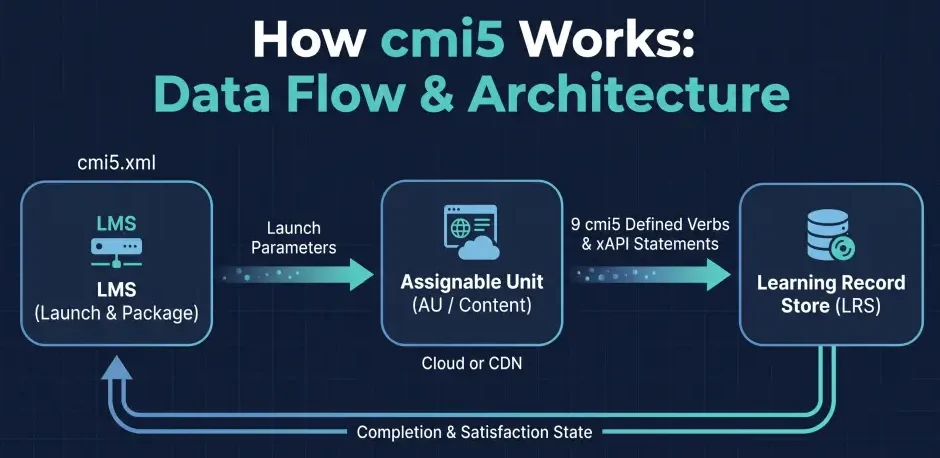
1. Assignable Units (AUs) vs. SCOs
In SCORM, a trackable piece of learning content is called a SCO (Shareable Content Object), and all of its HTML/media files must usually be zipped up and uploaded directly onto the LMS server so they share the same web domain.
In cmi5, the fundamental launchable unit of learning is an Assignable Unit (AU).
- An AU can be an interactive Storyline module, a video, a PDF, a mobile app activity, or a VR simulation.
- Content-as-a-Service Ready: Unlike SCORM, a cmi5 package does not have to contain the actual media files. You can upload a tiny, lightweight cmi5 zip package (just a few kilobytes) to your LMS, while the heavy video or interactive AU files sit on an external Cloud CDN, your own proprietary server, or a mobile app. Because cmi5 communicates via HTTP/REST to the LRS rather than same-domain browser JavaScript frames, cross-domain restrictions are completely eliminated.
2. The Course Structure (cmi5.xml)
While SCORM uses the notoriously complex imsmanifest.xml file, cmi5 uses a clean, modern XML file called cmi5.xml (or a JSON equivalent during import/export).
- A single cmi5 course can contain a single AU or a hierarchical tree of multiple Blocks and Assignable Units.
- Inside
cmi5.xml, the instructional designer defines themoveOncriteria for each AU, telling the LMS whether the learner needs to achieveCompleted,Passed,CompletedAndPassed,CompletedOrPassed, orNotApplicablebefore the AU is marked as “Satisfied.” - It also supports a
masteryScore(a normalized value between0.0and1.0) that the LMS passes to the AU at launch so you can change passing thresholds in the LMS without republishing your authoring tool source files!
3. The 6-Step Launch & Data Flow (LMS → AU → LRS)
Here is what happens behind the scenes when a learner clicks “Start Course” in a cmi5-compliant system:
- Course Import: The administrator imports the cmi5 package (or
cmi5.xmlmanifest) into the LMS (or via a plugin like GrassBlade xAPI Companion on WordPress). - LMS Launch: When the learner clicks launch, the LMS records a
"Launched"statement in the LRS and opens the AU URL, passing five standardized query parameters in the URL:endpoint(The URL of the LRS)fetch(A one-time URL the AU uses to grab its secure auth token)actor(The learner’s identity in JSON format)registration(The unique enrollment/attempt ID)activityId(The unique identifier of the AU)
- Token Fetch & Security Handshake: The AU calls the
fetchURL once to retrieve a temporary authorization token for this specific session. - State Configuration (
LMS.LaunchData): The AU queries the LRS State API to read theLMS.LaunchDatadocument (which contains themasteryScore, launch mode, and return URL) and sends the"Initialized"statement. - Learning & Tracking: As the learner interacts with the course, the AU sends standard cmi5 Defined Statements (for completion/grading) and as many custom “cmi5 Allowed” xAPI statements as you want (e.g., watching a video segment, clicking a hotspot, answering question #4).
- Termination & Satisfaction: When the learner exits, the AU sends a
"Terminated"statement. If themoveOncriteria are met, the LMS records a"Satisfied"statement and updates the learner’s gradebook.
The 9 Defined cmi5 Verbs Explained
To prevent the “Wild West” problem of raw xAPI, where every authoring tool invented its own verbs, cmi5 locks down 9 standardized system verbs distributed across three lifecycle stages.
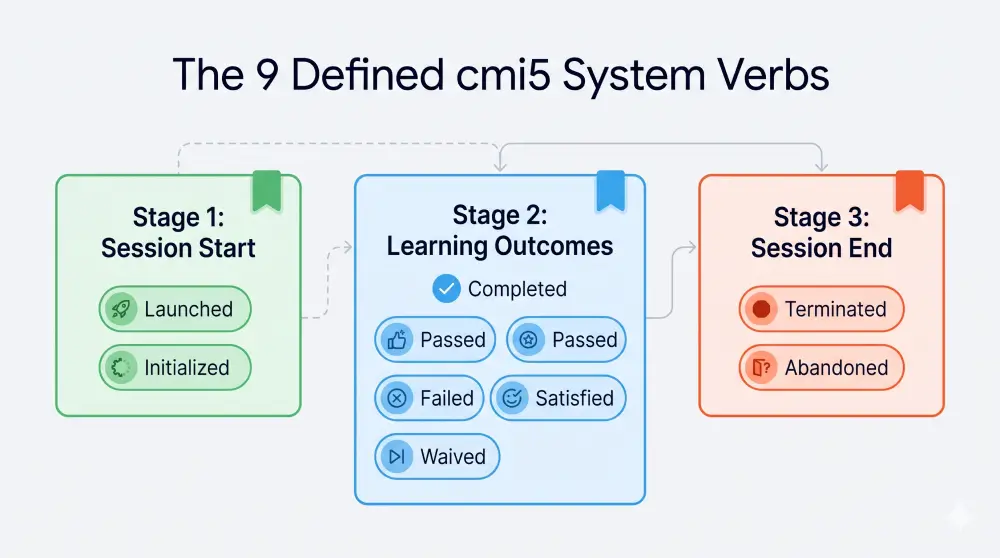
Notice that some verbs can only be sent by the AU (the content), while others can only be sent by the LMS:
Stage 1: Session Start
Launched(Sent by LMS): Recorded by the LMS the moment it constructs the launch URL and sends the learner to the AU.Initialized(Sent by AU): Recorded by the AU once it has loaded, fetched its security token, and is ready for learner interaction. Every session must begin withLaunchedfollowed byInitialized.
Stage 2: Learning Outcomes
Completed(Sent by AU): Indicates the learner has experienced or viewed all required parts of the AU.Passed(Sent by AU): Indicates the learner took an assessment within the AU and met or exceeded themasteryScore.Failed(Sent by AU): Indicates the learner took an assessment and scored below themasteryScore.Satisfied(Sent by LMS): Recorded automatically by the LMS when the learner meets themoveOncriteria defined incmi5.xmlfor a specific AU, a Block of AUs, or the entire Course.Waived(Sent by LMS): Used when an LMS administrator or adaptive pre-test grants the learner an exemption from completing an AU (with a documented reason in the statement extensions).
Stage 3: Session End
Terminated(Sent by AU): Sent when the learner properly exits the AU. OnceTerminatedis sent, the session token is invalidated and no further statements can be recorded for that session.Abandoned(Sent by LMS): What if a learner closes their browser tab abruptly or loses internet connection without clicking “Exit”? In SCORM, that session data is often lost or corrupted. In cmi5, if a session times out without aTerminatedverb, the LMS steps in and writes anAbandonedstatement to cleanly close the session in the LRS.
Pro Tip: “cmi5 Defined” vs. “cmi5 Allowed” Statements
Does cmi5 restrict you to only these 9 verbs? No! These 9 verbs are strictly for cmi5 Defined Statements (which control LMS status and grading). Alongside them, your course can send unlimited cmi5 Allowed Statements using any xAPI verb or profile, such as the xAPI Video Profile (played,paused,seeked) or custom simulation metrics, giving you the best of both worlds.
cmi5 vs. SCORM vs. xAPI: Side-by-Side Comparison
How do you know how cmi5 stacks up against SCORM (1.2 / 2004) and standalone xAPI? This comparison table breaks down the exact architectural and practical differences as of 2026.
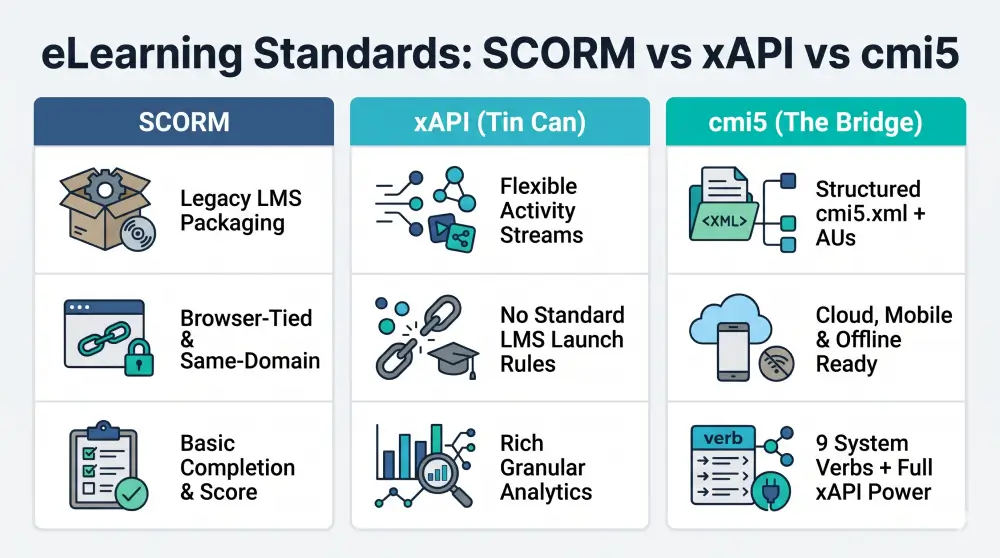
| Feature / Capability | SCORM (1.2 & 2004) | Standalone xAPI (Tin Can) | cmi5 (xAPI Profile for LMS) |
|---|---|---|---|
| Primary Role | Legacy LMS course packaging & basic tracking | Universal activity tracking across any digital/offline system | Modern LMS course packaging + full xAPI analytics |
| Data Format | Legacy JavaScript key-value pairs (cmi.core.*) & XML | Modern JSON (Actor - Verb - Object statements) | Modern JSON (Actor - Verb - Object statements) + cmi5.xml |
| Communication Method | Browser-bound JavaScript API (requires parent/iframe window) | RESTful HTTP requests directly to an LRS | RESTful HTTP requests directly to an LRS |
| Cross-Domain Content Hosting | No (Requires costly workarounds; content & LMS must share a domain) | Yes (Can track from anywhere with credentials) | Yes (Native support for remote/CDN-hosted AUs) |
| Standardized LMS Launch & Grading | Yes (Strictly defined, though SCORM 2004 sequencing is overly complex) | No (Lack of strict launch/completion rules causes LMS inconsistencies) | Yes (Strictly defined via 9 system verbs, moveOn, and LMS.LaunchData) |
| Pop-up Window / Iframe Required? | Yes (Relies on parent LMS frame staying open in browser) | No | No (Can replace the browser window or launch a native mobile app) |
| Mobile & Offline Support | Poor (Requires constant browser connection to LMS) | Excellent (Native mobile SDKs and local queuing) | Excellent (Supports mobile app launches & offline statement queueing) |
| Granular Analytics | Minimal (Completion, score, total time, basic interactions) | Unlimited (Video heatmaps, simulations, VR, real-world tasks) | Unlimited (Standard LMS completion + full custom xAPI statements) |
| Session Recovery (Browser Crash) | Fragile (Often loses data if LMSFinish doesn’t fire) | Manual (Up to developer implementation) | Robust (LMS automatically closes stale sessions via Abandoned verb) |
| 2026 Market Adoption | Dominant (~70%+ of legacy packages), supported by almost every LMS | High in L&D ecosystems, used for custom analytics, LXP, and video | Growing Steady, standard in DoD/Defense, modern authoring tools, & xAPI-ready LMSs |
Key Benefits of Using cmi5 (And Honest 2026 Realities)
Why Organizations Are Moving to cmi5
- Content-as-a-Service (CaaS) & Remote Hosting: If you are a training provider selling courses to 50 corporate clients, SCORM forces you to hand over your source files in a bulky ZIP, losing intellectual property control and making updates a nightmare. With cmi5, you send your clients a tiny
cmi5.xmlpackage. The actual media stays on your cloud server. When you fix a typo or update a video on your server, all 50 client LMSs instantly show the updated course, and you can cut off access if a subscription expires. - True Mobile & Pop-Up Free Experience: Modern learners hate pop-up blockers and tiny nested iframes on smartphones. Because cmi5 passes state via URL and REST APIs, a course can take over the full browser tab or hand off the session to a native iOS/Android app, then redirect the learner cleanly back to the LMS
returnURLwhen finished. - Rich Analytics Without Losing LMS Gradebooks: You get clean, audit-ready LMS completion records (
Completed,Passed,Satisfied,Waived) right alongside granular xAPI data in your LRS. - Decoupled Data Portability: Because all cmi5 records live in an LRS in standard xAPI format, migrating from one LMS to another no longer means losing historical learner analytics.
The Honest Reality of cmi5 Adoption in 2026
If cmi5 is technically superior to SCORM in every way, why hasn’t it replaced SCORM 100% yet?
- The “Good Enough” Inertia of SCORM: Roughly 70% of standard corporate compliance courses only need to report “Did the employee reach the final slide and pass the 10-question quiz?” For basic needs, legacy LMS vendors have been slow to prioritize new specifications when SCORM 1.2 already checks the box.
- LRS Requirement: To run cmi5, an LMS either needs a built-in Learning Record Store or a tight integration with an external LRS (like GrassBlade LRS). While leading systems now include this, budget legacy LMSs often charge extra or lack native cmi5 parsers.
- Where cmi5 is Winning Big in 2026: Driven heavily by U.S. Department of Defense (DoD) mandates (via ADL’s Distributed Learning Modernization initiatives), healthcare compliance, aviation, commercial content vendors (who need remote content hosting), and WordPress LMS power-users, cmi5 adoption has hit a strong inflection point over the last 24 months.
Tooling Ecosystem: What Supports cmi5 in 2026?
Before adopting a standard, you need to know if your existing authoring tools and LMS can handle it. Here is the verified support landscape in 2026:
Major Authoring Tools with Native cmi5 Export
You likely already own a tool that exports cmi5 out of the box, no coding required:
- Articulate 360 (Storyline 360 & Rise 360): Full native export to cmi5 (
Publish > LMS > cmi5). (Note: Articulate Rise is an authoring tool, or an all-in-one lightweight system in Rise.com, most teams export cmi5 packages from Rise 360 to host on their primary LMS). - iSpring Suite: Native cmi5 packaging and reporting support.
- Adobe Captivate (Classic & New Adobe Captivate): Supports publishing directly to cmi5 format.
- Dominknow | ONE: Built-in cmi5 publishing with rich xAPI statement extensions.
- Lectora (ELB Learning) & Gomo Learning: Full native cmi5 export support.
- H5P (via GrassBlade on WordPress): While standalone H5P emits xAPI events, pairing H5P with GrassBlade on WordPress allows you to track interactive video and quizzes seamlessly alongside cmi5 packages.
- ADL Project CATAPULT: If you build custom HTML5/React courses from scratch, ADL provides open-source cmi5 Client Libraries and the CATAPULT conformance test suite to validate your packages for free.
LMS Platforms & How to Run cmi5 on WordPress
- WordPress LMS Platforms (LearnDash, LifterLMS, TutorLMS, LearnPress, MasterStudy LMS): None of these WordPress LMS plugins support cmi5 natively out of the box. However, by adding GrassBlade xAPI Companion and GrassBlade Cloud LRS, your WordPress site immediately gains full, enterprise-grade cmi5 support. Including automatic course completion sync, gradebook passing scores, remote content hosting, and advanced xAPI video/question analytics.
- Enterprise / Cloud LMSs: Platforms like SCORM Cloud (Rustici), Docebo, Cornerstone OnDemand, TalentLMS, Absorb LMS, and Moodle (via cmi5 launch plugins) support cmi5 packages to varying degrees. (Note: What used to be called Adobe Captivate Prime is now Adobe Learning Manager, always verify with your enterprise rep whether their cmi5 parser supports multi-AU course structures or single-AU packages).
Decision Framework: When Should You Choose SCORM, xAPI, or cmi5?
Still not sure which radio button to click when hitting “Publish” in Articulate Storyline or iSpring? Use this practical cheat sheet:
Choose cmi5 if:
- You are launching courses from an LMS (or WordPress LMS with GrassBlade) and want both reliable LMS completion/gradebook updates and rich xAPI data in an LRS.
- You want to host your heavy media files or courses on an external CDN or cloud server while distributing lightweight launch packages to clients.
- You want to eliminate browser pop-up windows and iframe headaches on mobile devices.
- You work with government, defense (DoD/ADL), aviation, or enterprise clients requiring modern interoperability standards.
Choose Standalone xAPI if:
- The learning happens outside of a traditional LMS launch flow (e.g., tracking real-world job performance, IoT sensors, standalone mobile apps, Slack bots, or public web pages).
- You are using an LRS-connected wrapper (like GrassBlade’s native xAPI tracking) that already handles launch and completion mapping for your specific authoring tool.
Stick with SCORM (1.2 or 2004 3rd/4th Ed.) if:
- You are delivering a course to a client whose legacy LMS has no LRS and no cmi5 support.
- You only care about a basic “Completed/Incomplete” status and a final quiz percentage, and all files will be uploaded directly inside the LMS server.
Migrating from SCORM to cmi5: 3 Practical Steps
Transitioning your catalog from SCORM to cmi5 doesn’t require rebuilding your courses from scratch:
- Republish Source Files: If you have the original
.story(Storyline),.cptx(Captivate), or Rise 360 projects, simply open the project, change the LMS output dropdown fromSCORM 1.2tocmi5, and click Publish. - Connect an LRS to Your LMS: Ensure your LMS has a cmi5-capable launch engine and LRS connected. On WordPress, install GrassBlade xAPI Companion and link it to GrassBlade LRS (Cloud or Self-Hosted).
- Test with Multi-AU or Single-AU Workflows: Upload your cmi5
.zippackage. Test launching the course, completing an assessment, and verifying that both the detailed xAPI statements appear in your LRS Activity Stream and the lesson/topic automatically marks itself complete in your LMS!
Frequently Asked Questions (FAQs) About cmi5
1. What does cmi5 stand for?
cmi5 stands for Computer Managed Instruction (inherited from the original AICC specifications), and the 5 refers to the fifth major architectural redesign by the committee before finalizing the specification on top of xAPI. It does not stand for Content Management Interoperability Services.
2. Is cmi5 replacing SCORM?
Technically, yes, cmi5 was purpose-built by AICC and the ADL Initiative to be the true LMS-focused successor to SCORM. While SCORM remains widely used due to legacy LMS inertia, cmi5 is rapidly replacing SCORM in organizations that require mobile compatibility, cloud/CDN content hosting, cross-domain security, and granular xAPI analytics.
3. Does cmi5 require a Learning Record Store (LRS)?
Yes. Because cmi5 uses the xAPI communication specification to send and retrieve learning data (Actor - Verb - Object statements and State API documents), a cmi5-compliant LMS must either include an integrated LRS or connect to an external LRS (such as GrassBlade LRS) to function.
4. What is the difference between xAPI and cmi5?
xAPI is a broad, foundational communication specification for tracking any learning experience, but it does not define strict rules for how an LMS should package, launch, or evaluate course completion. cmi5 is a specific “profile” of xAPI that adds standardized rules for course structure (cmi5.xml), LMS launch parameters, session authentication, and 9 defined system verbs (Launched, Initialized, Completed, Passed, Failed, Satisfied, Waived, Terminated, Abandoned) so xAPI courses work predictably across any compliant LMS.
5. Can I use cmi5 on WordPress with LearnDash or LifterLMS?
Yes! By installing the GrassBlade xAPI Companion plugin alongside GrassBlade LRS, you can upload, launch, and track cmi5 packages seamlessly inside LearnDash, LifterLMS, TutorLMS, LearnPress, and MasterStudy LMS, including automatic lesson/quiz completion and rich reporting.
Ready to Experience cmi5 on Your WordPress LMS?
You don’t need an expensive six-figure enterprise LMS to take advantage of cmi5’s cross-domain flexibility, mobile responsiveness, and deep xAPI analytics.
With GrassBlade xAPI Companion and GrassBlade LRS, we built native cmi5 support directly into the WordPress LMS ecosystem years ahead of the curve. Whether you are exporting cmi5 packages from Articulate Storyline, Rise 360, iSpring, or Adobe Captivate, you can upload and track them in minutes.