
Most of the authoring tools including Articulate, Captivate, iSpring, and others support resuming the content from where you left off.
Default Behavior
Upon attempting an xAPI Content, a Registration ID is allocated to the user, which remains unchanged until the user completes the said content. The xAPI Content is allowed to resume using the same registration ID until completion. However, upon the user’s successful completion of the xAPI Content, the next attempt would start afresh from the beginning.
With GrassBlade xAPI Companion, you can customize this behavior using the “registration” property on the xAPI Content page.
Please check the examples given below:
Example 1
Always Resume the xAPI Content
Problem: You want the xAPI Content to always resume from where users left off even if users have completed the content.
Solution:
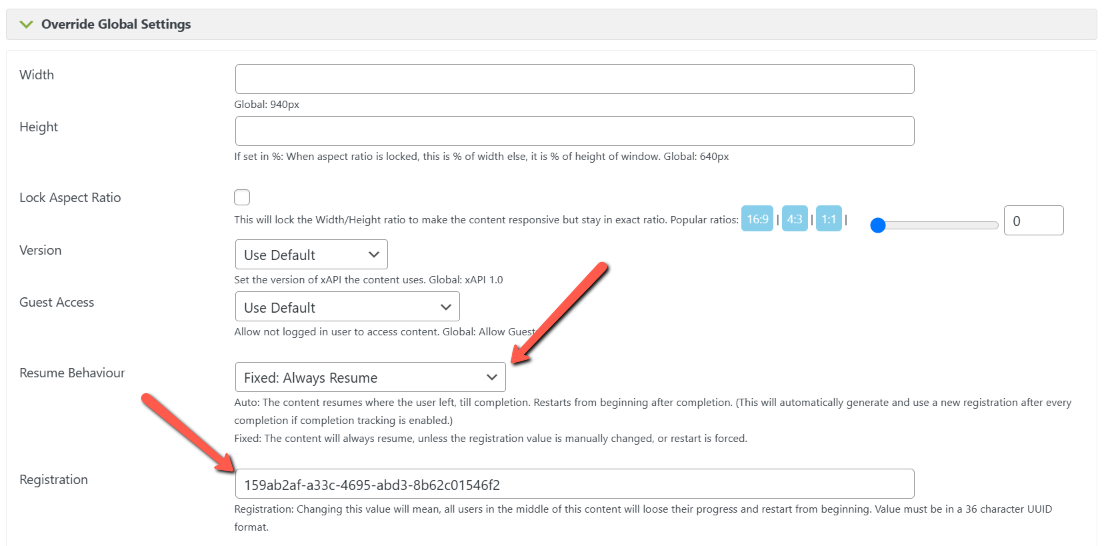
- Go to xAPI Content edit page > xAPI Content Details > Override Global Settings > Resume Behaviour
- Select “Fixed: Always Resume” in the dropdown.
- It’ll show an Registration field with an ID. Example: 36fc1ee0-2849-4bb9-b697-71cd4cad1b6e.
- Click the update button to save.
Note: It will reset the progress of all the in-progress users and they will start from the beginning. After a new attempt with fixed registration id, the progress will not reset even after completion.
Example 2
Resume till incomplete (default)
Problem: Let users resume from where they left off and reset the progress upon completion so that the next attempt begins from the start.
Solution: You can leave the registration value blank, or set the registration value to auto
Example 3
Resume for Guest Users
Guest Users, i.e. the users who have not logged in to the WordPress site cannot resume. As the resume feature would allow others to enter the email id and see the details submitted before.
Tips:
If you have many xAPI Contents to update, please use the bulk settings feature.
I am not sure what this means. Right now, my lesson videos are not resuming at the place they were at when a person hits Mark Complete button. They reset the video which is bad. The Registration thing is set to Auto. So are you saying that if I merely put a random UUID number in that field to replace the word auto. Suddenly, my videos will resume? Can you explain why that would be the case?
Hi Mike,
I can understand that it may not be immediately intuitive to understand the concept, unless you are coming from SCORM background. “Registration” is a SCORM property, (and subsequently adopted by xAPI). It denotes a specific enrollment instance (a specific content for a specific user). So, as long as all progress of the user taking the content is attributed with a specific registration value, it is assumed that he is taking it as part of that enrollment.
If the registration value changes, it means this is a fresh enrollment. For example, if you need your employees to take HIPAA course every year, they might need to take the same course again and again.
The default functionality resets the progress on completion by changing the registration value. So, that the course can be taken again a fresh.
Forcing the registration value to a particular string will make sure, it doesn’t change even on completion.
Pankaj